As e-commerce scales, manual workflows become liabilities—slowing fulfillment, increasing errors, and draining team bandwidth. Shopify Flow addresses this challenge with native, no-code automation built directly into the Shopify core—an essential capability increasingly leveraged by modern Shopify development services to help merchants automate everything from inventory updates to loyalty rewards.
The results are undeniable. According to Shopify’s Automated Commerce report, more than 3,600 businesses have used Flow to collectively run 1.1 billion workflows—reclaiming an estimated 9.2 million hours of productivity. From fraud prevention to personalized customer retention, Shopify Flow has become the invisible engine behind smarter ecommerce automation, helping brands grow without adding operational overhead.
In this blog, we’ll break down the 10 most impactful ways to use Shopify Flow, showing how merchants can streamline operations, boost conversions, and scale with confidence.
What is Shopify Flow & How Does it Work?
Shopify Flow is Shopify’s built-in, no-code ecommerce automation platform. It helps merchants eliminate repetitive tasks, streamline operations, and scale with ease.
Shopify Flow comes free on Basic, Grow, Advanced, and Plus plans. It runs natively inside your Shopify admin, giving instant access to store data—orders, customers, products, inventory, tags, and more—without API delays or external dependencies.
Unlike third-party tools that rely on webhooks or limited APIs, Flow is deeply integrated into Shopify’s core. Workflows run faster, stay stable during peak traffic events like Black Friday and Cyber Monday, and scale effortlessly as your business grows.
How does Shopify Flow work?
Workflows are built in a simple, visual editor using three core steps:
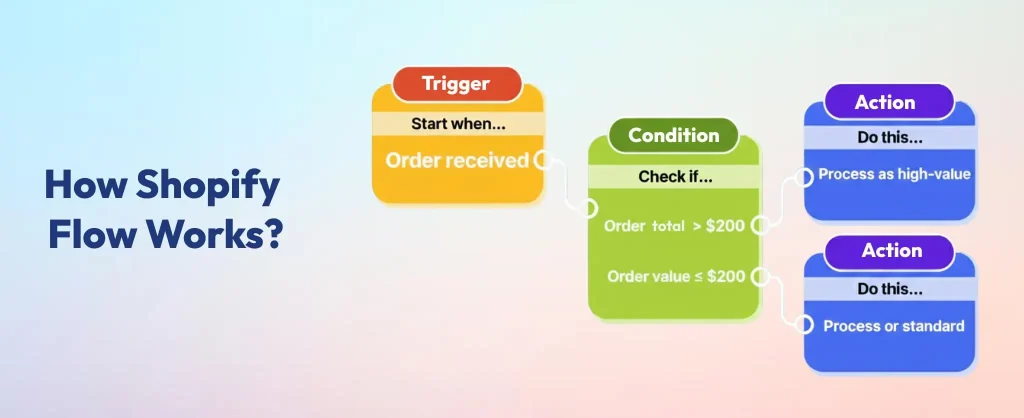
- Trigger – “When this happens” (e.g., Order Created, Inventory Updated, Customer Tagged).
- Condition – “If this is true” (e.g., Order total > $500, Risk level is High, Inventory < 5).
- Action – “Do this” (e.g., Tag customer as VIP, Send Slack alert, Hold fulfillment, Update Google Sheet).
This intuitive logic makes ecommerce automation accessible to every merchant, ensuring consistency, speed, and scalability across operations.
How to Use Shopify Flow for Ecommerce Automation: 10 Best Ways
Once you understand what Shopify Flow is, the real value comes from how you use it. Shopify Flow isn’t just about ecommerce automation—it’s about solving everyday pain points that slow growth. From inventory control to fraud prevention, customer segmentation, and loyalty programs, these workflows show how merchants can turn routine tasks into scalable systems that protect revenue and improve customer experience.
At The Brihaspati Infotech, we help brands unlock this potential by tailoring Flow automations to their unique business needs.
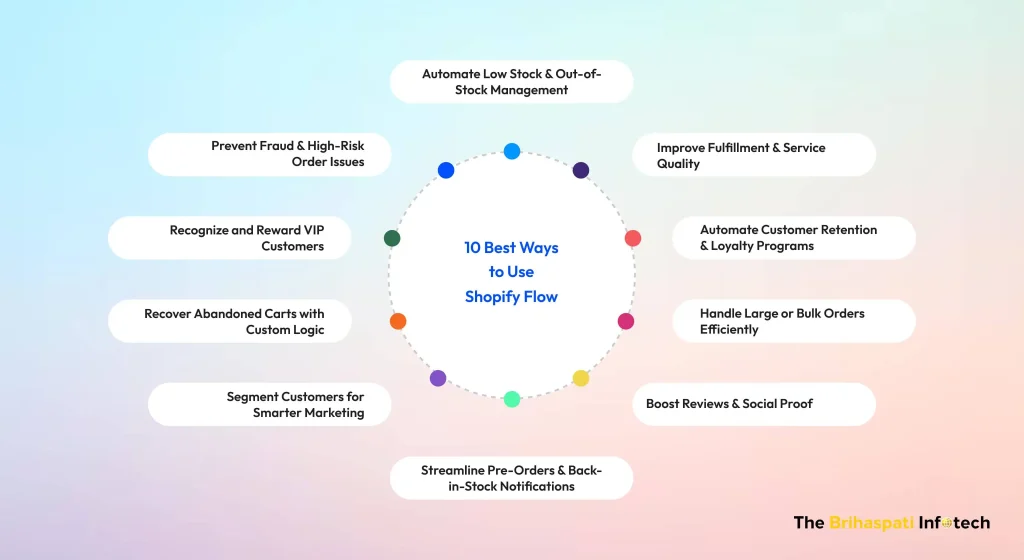
1. Automate Low Stock & Out-of-Stock Management
- Automatically hide products from your storefront when inventory hits zero and unhide them when restocked.
- Eliminates “dead clicks” and customer frustration. It ensures your store looks curated and professional while protecting your ad spend from driving traffic to unavailable items.
2. Prevent Fraud & High-Risk Order Issues
- Flag orders with “High” or “Medium” risk scores, add a “Potential Fraud” tag, and hold the fulfillment process.
- Saves thousands in chargeback fees and lost inventory. It moves your team from reactive damage control to proactive security.
3. Recognize and Reward VIP Customers
- When a customer’s total spend hits a milestone (e.g., $500), tag them as “VIP” and notify your team or trigger a special discount.
- Identifies your most profitable 5% of customers instantly. This allows for “white-glove” service that significantly boosts Customer Lifetime Value (LTV).
4. Recover Abandoned Carts with Custom Logic
- Send a personalized reminder or a unique discount code only to customers who abandoned a high-value cart (e.g., over $100).
- Increases recovery rates by offering incentives only when the potential revenue justifies the discount, protecting your profit margins.
5. Segment Customers for Smarter Marketing
- Automatically tag customers based on what they buy (e.g., “Men’s Apparel” vs. “Home Decor”) or how often they shop.
- Powers highly targeted marketing. Instead of “blasting” your whole list, you can send relevant offers that result in higher open rates and conversions.
- Managing multiple storefronts becomes even easier when paired with centralized content tools—see how in our blog on Shopify content management for multi‑store centralization.
6. Streamline Pre-Orders & Back-in-Stock Notifications
- Tag orders containing pre-order items and automatically move them to a “Pending Stock” folder in your admin.
- Prevents fulfillment errors. It keeps your warehouse organized so they don’t accidentally try to ship items that haven’t arrived at the building yet.
7. Boost Reviews & Social Proof
- Delay a review request email (via an app like Judge.me or Loox) until 7 days after the shipping carrier marks the order as “Delivered.”
- Ensures you only ask for reviews once the customer has actually used the product. This leads to higher-quality, 5-star reviews and more user-generated content.
8. Handle Large or Bulk Orders Efficiently
- If an order contains more than a specific quantity (e.g., 10+ units of one item), tag it as “Bulk Order” and send an internal alert.
- Alert your team to check for shipping discounts or B2B fraud. It ensures these high-stakes orders get the manual “eyes-on” they deserve before shipping.
- Custom apps can extend Shopify Flow into unique niches—for example, our project on creating 3D printed map tools in Shopify shows how personalization can be automated at scale.
9. Automate Customer Retention & Loyalty Programs
- Automatically add loyalty points or send a “We Miss You” gift card to customers who haven’t purchased in 60 or 90 days.
- Fights “Customer Churn” without manual monitoring. It keeps your brand top-of-mind and gives lapsed buyers a concrete reason to return.
10. Improve Fulfillment & Service Quality
- If an order remains “Unfulfilled” for more than 48 hours, send a Slack message to the fulfillment lead or an “Update” email to the customer.
- Proactive customer service. By catching delays before the customer complains, you maintain trust and reduce the number of “Where is my order?” support tickets.
What are the Benefits of Using Shopify Flow for Ecommerce Automation?
Adopting Shopify Flow is more than a convenience—it’s a strategic advantage. By automating critical workflows directly within Shopify, merchants unlock measurable improvements in efficiency, cost control, and customer experience. These core benefits are what make Shopify Flow a true game-changer for ecommerce automation.
| Benefit | Description |
|---|---|
| Cost‑Efficiency | Shopify Flow is included at no additional cost on Shopify Basic, Grow, Advanced, and Plus plans. Merchants can save hundreds of dollars each month compared to third-party automation tools. |
| Speed & Reliability | Flow runs natively within Shopify’s core infrastructure. Workflows execute instantly, with zero latency. Even during peak traffic events like Black Friday and Cyber Monday, automations remain stable and dependable. |
| Deep Integration | Flow has direct access to Shopify data—orders, customers, products, inventory, tags, and metafields. This enables more precise, flexible, and scalable automation than external apps can offer. For deeper insights into how syncing data across systems enhances automation, explore our guide on building a custom data sync app for Shopify. |
| Scalability | Shopify Flow processes over one billion decisions every month. Merchants can start with simple workflows and expand automation as their operations evolve. |
| Ease of Use | Flow’s visual editor and extensive template library make setup fast and intuitive. Launch automations in minutes. |
| Improved Customer Experience | Automation streamlines fraud prevention, loyalty rewards, order fulfillment, and customer notifications. The result is faster service, fewer errors, and more personalized engagement at every touchpoint. |
Ready to Automate Smarter with Shopify Flow? Hire Shopify developers today and transform your store with automation that works.
How to Get Started with Shopify Flow for Ecommerce Automation?
Getting started with Shopify Flow is simple. Follow this three‑step plan to launch effective ecommerce automation without coding:
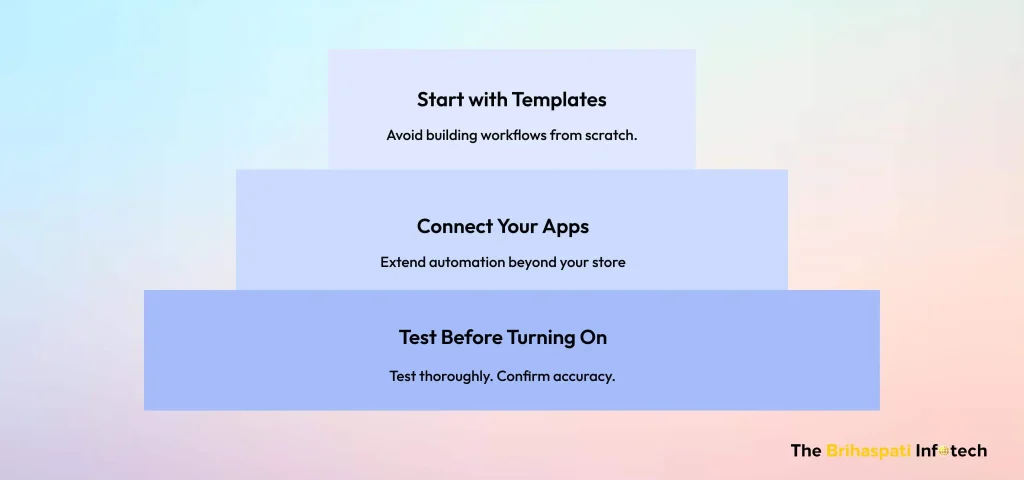
Start with Templates
- Avoid building workflows from scratch.
- Shopify provides a library of 100+ Flow templates designed for common ecommerce use cases, including low-stock alerts, VIP customer tagging, fraud detection, and abandoned cart recovery.
- Select a template. Customize it to your needs. Publish it quickly.
Connect Your Apps
- Extend automation beyond your store.
- Shopify Flow integrates with popular tools such as Slack for internal alerts, Google Sheets for structured data tracking, and Klaviyo for automated email campaigns.
- This ensures your workflows reach across your entire tech stack.
Test Before Turning On
- This step is essential. Use Flow’s built-in Preview feature to validate triggers, conditions, and actions before activation.
- Test thoroughly. Confirm accuracy. Prevent errors before they impact operations.
With templates, app connections, and testing in place, you’re ready to automate smarter and scale faster with Shopify Flow.
What are the Advanced Tips & Best Practices for Shopify Flow in 2026?
Once you’ve mastered the basics of Shopify Flow, scaling automation requires smarter strategies. Here are the best practices to future-proof your workflows in 2026:
- Use Sidekick AI for quick builds: Speed up workflow creation with AI-assisted suggestions. Reduce setup time and minimize errors.
- Test before activation: Always preview workflows to validate triggers and actions. Catch mistakes before they impact operations.
- Integrate with apps: Extend Flow’s reach by connecting tools like Klaviyo for marketing, Slack for alerts, and Google Sheets for reporting.
- Monitor runs and history: Check execution logs regularly. Identify failures early and keep automations reliable.
- Scale strategically: Start small with 3–5 workflows. Audit monthly, refine, and expand as your business grows.
- Keep your workspace clean: Use vertical layout and auto-arrange features for a tidy, manageable workflow environment.
By following these practices, merchants turn Shopify Flow from a simple automation tool into a scalable operations engine—delivering faster builds, fewer errors, and a future-ready automation strategy.
Frequently Asked Questions
Shopify Flow is a free, no‑code automation tool built into Shopify that helps merchants streamline repetitive tasks, integrate with apps, and scale operations efficiently. To use it, you start with templates, connect apps, and test workflows before activating them.
Want to Get More Out of Shopify Flow? Elevate your store with expert Shopify development solutions—build smarter automations and scale with confidence.
Yes. Shopify Flow integrates with popular apps such as Klaviyo (marketing automation), Slack (team notifications), and Google Sheets (reporting and tracking).
Need help setting up advanced integrations? Hire expert Shopify developers to customize workflows and unlock the full potential of Shopify Flow for your business.
Yes. With integrations, monitoring tools, and AI‑assisted workflow builders like Sidekick, merchants can design complex automations tailored to their business.
Need expert help building advanced workflows? Contact us
Shopify Flow is the Key to Future‑Ready Ecommerce
Shopify Flow is the backbone of ecommerce automation—turning repetitive tasks into reliable workflows that save time, reduce errors, and fuel growth. With Shopify flow templates, app integrations, and AI‑assisted builds, Flow scales seamlessly into a true automation engine, driving efficiency, consistency, and smarter decisions across your store.
Our Shopify development agency provides end‑to‑end services to set up Shopify Flow automations, customize workflows, and help you scale ecommerce operations with smarter, error‑free processes.
Want to explore more ways to grow with Shopify? Discover how a custom Shopify Data Sync App can extend Flow’s automation power, unify sales insights, and help you make smarter decisions.
Ready to build advanced Shopify Flow workflows? Contact us today to design, customize, and scale automations tailored to your business.
Stay Tuned for Latest Updates
Fill out the form to subscribe to our newsletter